


Wednesday, March 21, 2012
New Tutorial featuring Art Whimsico

This tutorial was written on March 19,2012.
Any similarities to another tutorial is purely coincidental.
All my tutorial are register with My Free Copyright.
All my tutorial are register with My Free Copyright.
Please do not claim as your own.
This tutorial writer assumes you have a working
This tutorial writer assumes you have a working
knowledge of using Paint Shop Pro.
This tutorial was done in Paint Shop Pro9,
but can be adapted to use in other This tutorial was done in Paint Shop Pro9,
Paint Shop Pro versions.
SUPPLIES NEEDED
Tube of choice: I'm using the awesome work of Art Whimsico.
Please do not use unless you have a license to do so. You can get her tubes HERE
Scrapkit of Choice: I am using Fantasy Moments FTU Scrap kit called Easter
You can purchase it HERE....Thank you
Mask of choice:I am using EDB mask #16.She is under construction
right now, please choose another mask.. Thank you
Template of Choice: I am using Denz's Designs-Template #120
You can download it HERE....Thank you Denny
Two Easter tubes of choice...one of eggs
Template of Choice: I am using Denz's Designs-Template #120
You can download it HERE....Thank you Denny
Two Easter tubes of choice...one of eggs
Xero - Mistified..you can get it HERE
Font for word art is Sakkal Majalla...HERE
Font for Name is Johannes...HERE
Copy write is always done in Pixelette ...HERE
Drop shadow use through out H-2/V-2/O-65/B-6.00
Please leave a thank you when you downloading for supplies.
my tag is just a guide...please use your imagination and make the tag your own
you do not have to use any of the supplies I used.
LET'S BEGIN
Open up Template and ShiftD and close original...delete copyright layer
resize template 600x600 for space to work/we will resize again at the end/
close all layers/choose paper of choice/copy/paste and put underneath
background layer/go to mask of choice with these setting and click ok
Font for word art is Sakkal Majalla...HERE
Font for Name is Johannes...HERE
Copy write is always done in Pixelette ...HERE
Drop shadow use through out H-2/V-2/O-65/B-6.00
Please leave a thank you when you downloading for supplies.
my tag is just a guide...please use your imagination and make the tag your own
you do not have to use any of the supplies I used.
LET'S BEGIN
Open up Template and ShiftD and close original...delete copyright layer
resize template 600x600 for space to work/we will resize again at the end/
close all layers/choose paper of choice/copy/paste and put underneath
background layer/go to mask of choice with these setting and click ok

delete background layer
On the following raster layers follow these directions...
activate lg circle layer/adjust/hue saturation/hue map with these setting
click ok/add drop shadow/keep activated

copy/paste element 24 on top of lg circle layer/resize/place where you
want what part to show/add drop shadow
activate square layer/copy/paste paper of choice/go to square layer
invert/go to paper layer and delete/merge down/add drop shadow
copy/paste bunny/resize to fit /add drop shadow/now copy/paste yellow frame
resize to fit square/make sure bunny is underneath yellow frame/add drop shadow
activate strip 2 top/choose three colors/go to material properties with
these setting/then gradient editor with these setting/ click ok/


flood fill strip with these colors/add drop shadow
activate strip2 bottom/reverse colors and flood fill bottom strips with
these colors/add drop shadow
leave word art layers as is and bring the heart layers down and place on
word art layer/(see my tag for reference)
on the top and bottom layers where the hearts were/choose font (Sakkal Majalla)
size 14 and type out Happy Easter three times/color-white
activate pink circle layer/copy/paste paper of choice/go to pink circle layer
invert/go to paper layer and delete/merge down/add drop shadow
copy/paste/resize bunny tube/place on top of pink circle layer/
activate strip2 bottom/reverse colors and flood fill bottom strips with
these colors/add drop shadow
leave word art layers as is and bring the heart layers down and place on
word art layer/(see my tag for reference)
on the top and bottom layers where the hearts were/choose font (Sakkal Majalla)
size 14 and type out Happy Easter three times/color-white
activate pink circle layer/copy/paste paper of choice/go to pink circle layer
invert/go to paper layer and delete/merge down/add drop shadow
copy/paste/resize bunny tube/place on top of pink circle layer/
on duplicate/filter xero/mistified effect with these setting/

click ok/add drop shadow to both
activate blue circle layer/copy/paste paper of choice/go to blue circle layer
invert/go to paper layer and delete/merge down/add drop shadow
I put the basket of eggs and eggs in blue circle/duplicate/close duplicated
layer/on original layer/blend/screen/add drop shadow
on duplicated layer lower opacity to 80%/now place both duplicated layers
on to of original layers
now add any other element you wish to use to make
activate blue circle layer/copy/paste paper of choice/go to blue circle layer
invert/go to paper layer and delete/merge down/add drop shadow
I put the basket of eggs and eggs in blue circle/duplicate/close duplicated
layer/on original layer/blend/screen/add drop shadow
on duplicated layer lower opacity to 80%/now place both duplicated layers
on to of original layers
now add any other element you wish to use to make
your tag your own/add drop
shadow on each element
add your watermark and copyright credits/
shadow on each element
add your watermark and copyright credits/
give it a slight gradient glow
...now give your tag to a friend.
You're done...thank you for trying my tutorial
please send me a copy so that I can show case it on my blog
send to riggsbee53@gmail.com


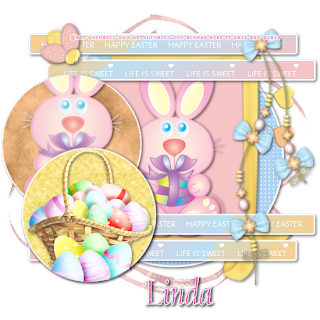
...now give your tag to a friend.
You're done...thank you for trying my tutorial
please send me a copy so that I can show case it on my blog
send to riggsbee53@gmail.com


Monday, March 19, 2012
"Oriental Beauty" Tut & Tags Featuring Jenna Whyte

For this Tutorial I am
using the work of
This is a PTU Tube you
can purchase this tube from
If using this tube make
sure you have the proper licenses.
I am also using the
Oriental Scrap Kit
Originally from “Scraps
and More”
which has since been
closed.
You will need no
Filters
Lets get started ...
Open 600 x 600 white
image
No worries you can
re-size later
Now pick a color for
your mask
I am using Becky_
Mask019
Layers/Load-Save
Mask/Load Mask From Disk
Create Mask From:
Source Luminance
Orientation: Fit To
Canvas
Options: Hide All Mask
Merge/Merge Group
Add all the scrap you
want to use
Add your tube re-size
if you want.
Now new layer and add
you copyright info. and your name.
X out of everything
expect for 1 element from your scrap,
Mask & Background
Merge/Merge Visible
X out of this and open
the others
Merge/Merge Visible
Reopen your
background/copy
Animation
Open Animation Shop
paste as new animation or ctrl+v
Insert Image
Effects/underwater
Custom/Effects/Apply
Sunlight Dappling
Sunlight Intensity: 10
Liquid Properties/Water
Depth: 30
Waves/Wave: 11
X: 0
Y: 0
OK
Animation
Cull Animation
Remove 1 frame for
every 2
Repeat this step making
5 frames
Back to PSP
Highlight and copy your
top images
Back to Animation shop
Paste as new animation
or ctrl+v
Duplicate 3 times this
will give you 5 frames
Ctrl+A+C
Highlight your
background
Ctrl+A+E
Keep frame properties
at 10 and save.
Would love to see your
results.


Sunday, March 18, 2012
My Heart Tag


Subscribe to:
Posts
(Atom)
Grab Our Button


